Google shows an AI Overview at the top of a growing share of searches, and for many commercial keywords it's the first thing a buyer reads. But the overview changes from one search to the next. Check once, and you might see your brand named. Check again an hour later, and it's gone, or the overview has disappeared altogether.
So tracking AI Overviews properly means checking repeatedly and turning the checks into rates. This guide shows how, using data from SERPent: 8,988 AI Overview checks between September 23 and November 4, 2026, for 162 keywords across 11 brands in the US and Canada. Every number comes with its sample size.
How to track Google AI Overviews, in five steps:
- Choose the seed keywords buyers type into Google, and keep branded keywords in a separate group.
- Check each keyword several times, logged out, with a fixed country and language.
- For each check, log whether an AI Overview appeared, which brands it named, and which pages it cited.
- Turn the log into three rates (shown, named and cited), per keyword and per market, and review them weekly.
- Use Search Console and GA4 for the traffic side, knowing they can't separate AI Overviews cleanly.
What is Google AI Overview tracking?
AI Overview tracking means recording, for each keyword you care about, what Google's AI Overview did over many checks. Three numbers matter, and they tell different stories:
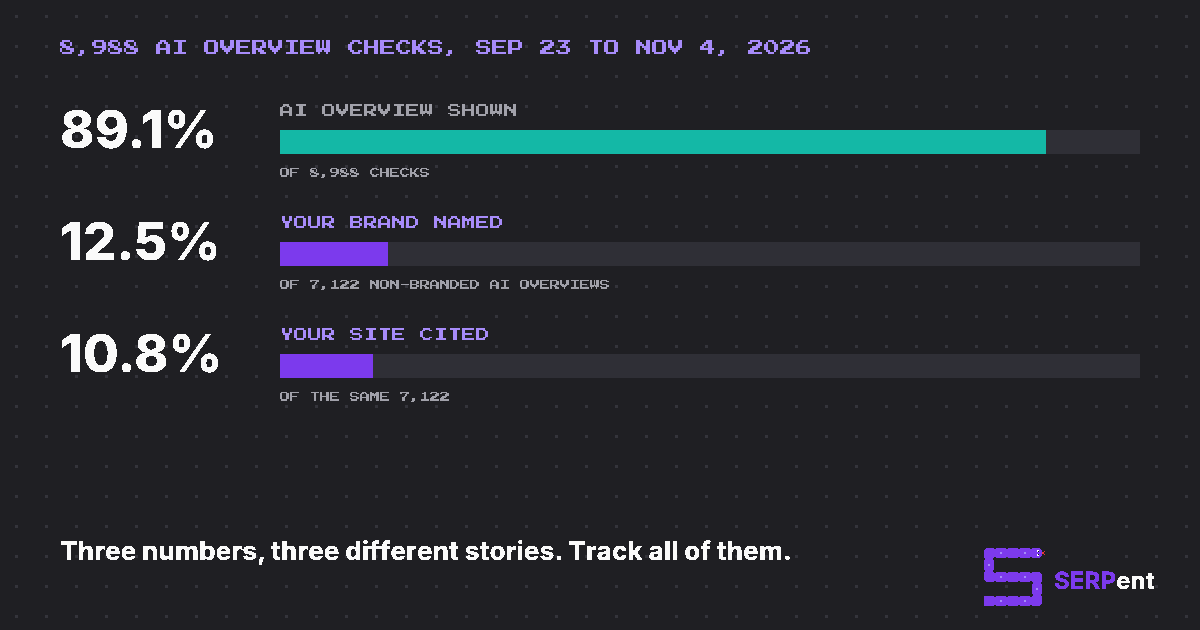
- Shown rate: how often Google displays an AI Overview for the keyword at all.
- Named rate: how often the overview names your brand (and each competitor) in its text.
- Cited rate: how often one of your pages is among the sources it links to.
For the keywords our customers track, an AI Overview appeared in 89% of checks, but the brand behind each keyword was named in only 12.5% of the overviews for non-branded keywords, and cited in 10.8%. A report that only says "AI Overviews show for 89% of our keywords" would hide the fact that this set of brands is missing from almost nine in ten of them.
One caveat on that 89%: these are keywords chosen by businesses, mostly commercial ones, so they trigger AI Overviews far more often than average. Across all searches, Google showed an AI summary on about 18% of searches in Pew Research Center's 2025 study of US browsing data.
What 8,988 AI Overview checks taught us
Before the method, here's what the data says about AI Overviews themselves. It's a field report from SERPent's own tracking (11 brands in e-commerce, B2B infrastructure, a marketplace, travel, local services and SEO), not a random sample of the web, but it shows why AI Overviews need repeated checks.
| Finding | Result | Sample |
|---|---|---|
| Keywords that showed an AI Overview on every check | 25% | 146 keywords with 9+ checks |
| Keywords that showed one only some of the time | 74% | 146 keywords |
| Same keyword, same day: the checks disagreed on whether an AI Overview appeared | 19.2% of keyword-days | 2,981 keyword-days |
| An AI Overview appeared or disappeared from one day to the next | 14.5% | 2,843 day pairs |
| Same-day repeats that cited the exact same set of pages | 29.6% | 6,953 pairs |
| First-week source domains still cited in the last week | 47.4% | 86 keywords tracked 15+ days |
| Cited pages that ranked on Google's organic page one | 28.7% | 38,206 cited URLs |
| AI Overviews citing at least one YouTube video | 29.8% | 8,002 AI Overviews |
| AI Overviews shown in the US vs Canada | 90.9% vs 82.1% | 7,085 and 1,903 checks |
The pattern is clear: whether an AI Overview appears, what it says and which sources it cites all move on their own, day to day and even within a day. Third-party research agrees. Ahrefs found AI Overview text changed in about 70% of repeat observations, with around 45% of cited URLs new each time, even though the meaning stayed much the same.
How to track AI Overviews, step by step
Step 1: Choose your seed keywords
AI Overviews appear on Google searches, so you track them with the keywords people type into Google, not with long chatbot prompts. Build the list from:
- Search Console queries for the pages you want cited, especially non-branded ones.
- Question and comparison keywords. Longer, question-style searches trigger AI Overviews far more often. Pew found summaries on 8% of one- or two-word searches but 53% of searches with 10 or more words.
- Commercial keywords like "best [product] for [situation]". AI Overviews are no longer mostly informational: Semrush's study found the share of commercial queries among those triggering an AI Overview more than doubled between late 2024 and late 2025.
Keep branded keywords in a separate group. In our data, AI Overviews for branded keywords named the brand 94% of the time (n=882), against 12.5% for non-branded ones. Mix them, and your numbers look far better than reality.
If you also track Google AI Mode or ChatGPT, write a full prompt for each keyword too, because that's what people type there. Our guide on how to choose prompts to track covers how to pair them.
Step 2: Check each keyword more than once
One check is a coin toss. In our data, a single check would have put a keyword in the wrong bucket (AI Overview shown or not) about 8% of the time across all 146 keywords, and same-day repeats cited a different set of sources 70% of the time.
For each check, keep the conditions fixed so you're measuring Google, not your setup:
- Search logged out, in a private window, with no extensions that change the page.
- Fix the country and language, for example with the
glandhlparameters on the Google URL, or a location setting in your tool. - Check at a similar time each day, and more than once a day if you can.
Step 3: Log the shown, named and cited results
For every check, record one row:
| Date | Keyword | Market | AI Overview? | Brands named (in order) | Your page cited? | Cited domains |
|---|---|---|---|---|---|---|
| Nov 2 | best hiking backpack | US | Yes | Ridgeline, You, Summitly | No | youtube.com, reddit.com, outdoorgearlab.com |
| Nov 2 | best hiking backpack | US | No | – | – | – |
| Nov 2 | best hiking backpack | US | Yes | Summitly, Ridgeline | Yes | yoursite.com, youtube.com |
That's illustrative data, but it's what real checks look like: three checks of one keyword on one day, with three different results. Count a check with no AI Overview as "not named" rather than dropping it, so your rates aren't flattered.
Step 4: Turn checks into rates and review them weekly
At the end of each week, roll the log up per keyword and per market: shown in X of N checks, named in Y, cited in Z, and the competitors named most often. Then:
- Review weekly, judge monthly. Daily numbers swing; trends over several weeks are what to act on.
- Note Google's changes. When Google rolls out a model or interface update, baselines can shift for everyone. Mark those dates on your charts.
- Keep the keyword list fixed for each reporting period, so a change in the numbers reflects Google, not your setup.
Doing this by hand works for 10 to 20 keywords. To track brand mentions in Google AI Overviews continuously, across more keywords and markets, a tracker saves the work: SERPent's AI Overviews tracker runs each seed keyword several times a day in each market, counts checks without an AI Overview toward n, and keeps every captured overview so you can read exactly what Google said.
How to track brand and competitor mentions in AI Overviews
Mentions are where AI Overviews influence buyers most: "the best options are X, Y and Z" is a shortlist. To track them, record every tracked brand named in each overview, in the order they appear, then report:
- Named rate per brand: named in Y of N AI Overviews.
- Position: the order among tracked brands in the overview. In SERPent, #1 means your brand was the first tracked brand named. It's not the same as your organic ranking, and because the order varies between checks, read it as an average.
- Share of voice: your share of all tracked-brand mentions. See what share of voice in AI search is for how to calculate it.
Track mentions and citations separately, because they diverge. In our non-branded data, brands were named but not cited in 3.8% of AI Overviews and cited but not named in 2.0% (n=7,122). A citation without a mention means Google used your page to answer but recommended someone else.
How to track AI Overview citations
Citations are the links Google shows as the overview's sources. In our data, AI Overviews cited an average of 5.1 pages each, and 95% cited at least one. Track which of your pages are cited, which competitors' pages are, and which third-party pages keep appearing.
Ranking still matters a lot:
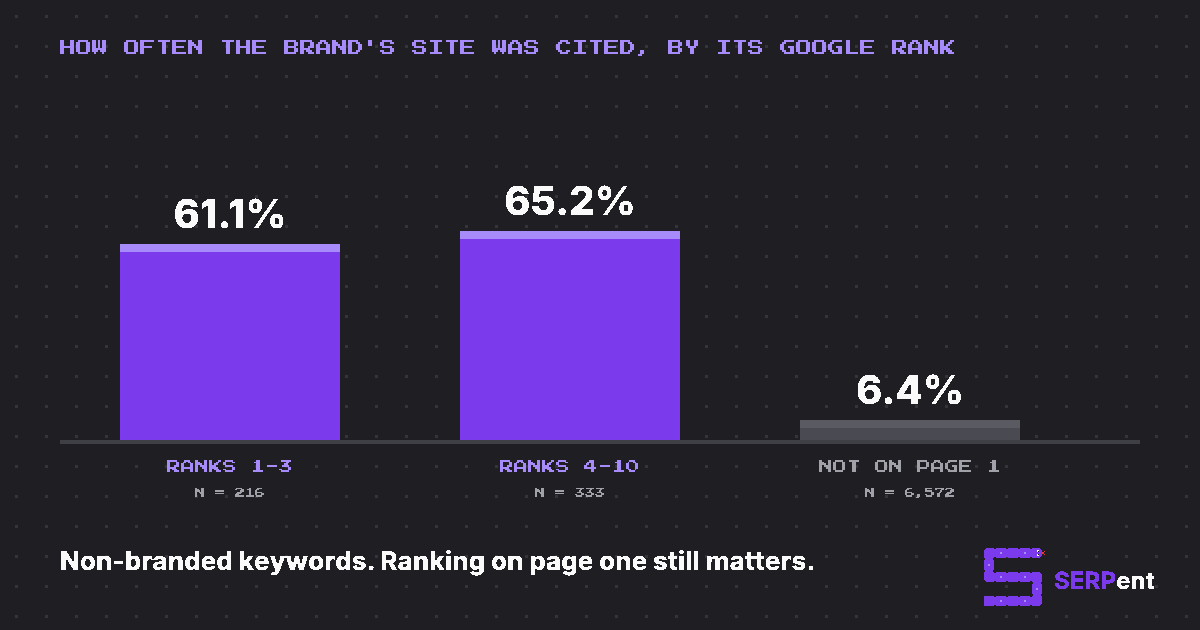
When the brand's own site ranked on page one for the keyword, it was cited in about 61% to 65% of AI Overviews. When it didn't, that fell to 6.4%. But AI Overviews don't just copy page one: only 28.7% of all cited pages were on the organic first page for that keyword. Ahrefs' March 2026 study found a similar share, with many citations coming from pages that rank much lower.
That's why the most useful citation report lists the pages AI Overviews cite where you're absent: the forum threads, reviews and lists shaping the answer. SERPent's Actions feature (in beta) builds that list for you, and you can export every citation as a CSV.
YouTube is the most-cited source in AI Overviews
YouTube deserves its own line in your tracking. In our data:
- 29.8% of AI Overviews cited at least one YouTube video (n=8,002), rising to 40% for branded keywords.
- YouTube was the most-cited domain overall, at 6.2% of all citations, ahead of Reddit at 2.7%.
- Shorts made up 12.3% of the YouTube links cited.
Ahrefs also found YouTube to be the most-cited domain in AI Overviews. So if your brand has videos that answer the questions behind your keywords, track whether they're cited, and if competitors' videos keep appearing where yours don't, that's a content gap worth filling.
How to track AI Overviews rankings over time
"Ranking" in an AI Overview isn't a position on a results page. Google treats the whole overview as a single result, so the useful measures over time are your named rate, your position among the brands named, and your cited rate, each per week.
Expect churn even when nothing changes on your side. In our data, only 47% of the source domains cited in a keyword's first week were still cited in its last week. Set a baseline over the first two to four weeks, then compare each week with a rolling four-week average rather than with yesterday.
Does Google Search Console track AI Overviews?
Partly. Here's what Search Console shows in late 2026:
- AI Overviews are inside your normal totals. Clicks and impressions from AI Overviews count in the Performance report under Web search. According to Google's help page, the whole AI Overview takes one position, and every link in it gets that same position.
- There's a generative AI report, with limits. Google announced generative AI performance reports on June 3, 2026, available to all sites by August 31. They show impressions from Google's AI features by page, country, device and date. But they combine AI Overviews with AI Mode, show impressions without clicks, and have no query breakdown.
- It can't show mentions. Search Console only knows about your links. It can't tell you whether an AI Overview named your brand, or which competitors it recommended instead.
A useful workaround: take the queries you know trigger AI Overviews (from your tracker), and watch their click-through rate in Search Console. A falling CTR at a steady position often means an AI Overview is answering the question before anyone clicks.
How to track traffic from AI Overviews in GA4
GA4 can't separate AI Overview visits on its own. Google's default channel definitions count AI Overviews and AI Mode as Organic Search, and the newer AI Assistant channel, for ChatGPT, Gemini, Copilot and others, explicitly leaves them out.
Three workarounds, from most to least reliable:
- A cited-pages segment. Build a GA4 segment of the organic landing pages your tracker shows being cited in AI Overviews, and compare their engagement and conversions with organic pages that aren't cited.
- The text-fragment method. Links from AI Overviews often add a
#:~:text=fragment to the URL, and some guides capture it with Google Tag Manager. It can't tell AI Overviews apart from featured snippets, and at least one practitioner reported it stopped working reliably in May 2026, so treat it as a sample, not a count. - Ignore parameters you didn't set. A
st_source=ai_overviewparameter that circulated in October 2026 came from a browser extension, not Google.
For Google's other AI surface, see how to track AI Mode traffic.
Track each market separately
AI Overviews behave differently by country. In our data, an AI Overview appeared in 90.9% of US checks but 82.1% of Canadian checks (n=7,085 and 1,903). Google launched AI Overviews in Canada, in English, in October 2024, months after the US.
So track each market as its own baseline, with keywords worded the way people there search, and never average the US and Canada together. SERPent tracks the US and Canada as separate markets.
What is the best AI Overview tracker?
The right tool depends on what you need to see. The main options:
- SERPent (that's us): built for agencies. It tracks AI Overviews with seed keywords and AI Mode and ChatGPT with full prompts, 3 answers per keyword per platform per day, in the US and Canada, with names, positions, citations and share of voice, and the n next to every rate. Plans start at $29/mo with a 7-day free trial. There's no API or white-label reporting yet.
- Semrush: its rank tracking flags keywords that trigger an AI Overview and whether you're cited, and its AI Visibility Toolkit tracks mentions across AI platforms.
- Ahrefs: Brand Radar tracks brand mentions in AI Overviews across a large prompt index, alongside its SEO data.
- SE Ranking, Keyword.com and other rank trackers add AI Overview presence and citations to classic rank tracking.
Comparing dedicated AI visibility tools? Our sourced comparisons cover Otterly.AI alternatives, Peec AI alternatives, Profound alternatives and more, with what each tracks and costs.
How to track AI Overviews: FAQ
What is Google AI Overview tracking?
It's checking your keywords on Google repeatedly and recording three things each time: whether an AI Overview appeared, whether it named your brand and your competitors, and which pages it cited. Turning those checks into rates, tracked over weeks, shows your real visibility in AI Overviews.
Does Google Search Console track AI Overviews?
Partly. Clicks and impressions from AI Overviews are counted in the normal Performance report under Web search, mixed in with everything else. Since mid-2026 there's also a generative AI report, but it shows impressions only, combines AI Overviews with AI Mode, and has no query breakdown. It can't show brand mentions or which link in the overview was clicked.
How do I track AI Overview traffic in GA4?
You can't separate it natively. GA4 counts clicks from AI Overviews as Organic Search, and its AI Assistant channel explicitly leaves Google's AI features out. The best proxy is a segment of the landing pages a tracker shows being cited in AI Overviews, compared with organic pages that aren't.
Does Semrush track AI Overviews?
Yes. Semrush shows which keywords trigger an AI Overview and whether your domain is cited, in its rank tracking and in its AI Visibility Toolkit. Ahrefs, SE Ranking, Keyword.com and dedicated AI visibility tools like SERPent track them too, in different ways.
How often do AI Overviews change?
Often. In our data, the same keyword's three checks on the same day disagreed on whether an AI Overview appeared 19% of the time, and the cited sources were identical in only 30% of same-day repeats. Track daily, review weekly, and judge changes over several weeks.
What's the difference between a mention and a citation in AI Overviews?
A mention is your brand named in the AI Overview's text. A citation is a link to your page among its sources. In our data, brands were named without being cited in 3.8% of non-branded AI Overviews and cited without being named in 2%, so track both.
Are AI Overviews personalized?
They can vary with location, language and device, and possibly with the signed-in account. For tracking, check logged out, with a fixed country and language, so your numbers reflect what a typical searcher sees rather than your own history.
Is Google AI Mode tracked separately from AI Overviews?
It should be. AI Mode is a separate, conversational surface: people type full questions into it, not keywords. Track AI Overviews with seed keywords and AI Mode with full prompts, and report them separately.