"You're mentioned in 60% of AI answers" sounds like a result. But 60% of what? If the prompts behind it were 15 questions someone made up in an afternoon, half of them containing the client's brand name, the number means very little.
Your prompt list is the denominator of every answer engine optimization (AEO) metric you'll report: mention rate, position, share of voice and citations. Choose it badly and no tool can save the data. Choose it well and the numbers start telling you what to do next.
Most guides on this stop at "brainstorm prompts for each funnel stage". This one goes further. It covers why Google AI Overviews need a different input from ChatGPT and AI Mode, a simple way to score and cut prompts, prompt counts that actually add up, an end-to-end example for an agency client, and a template you can paste straight into a spreadsheet.
How to choose prompts to track, in seven steps:
- List the 5 to 8 topics the business actually sells, and who buys each one.
- Collect real questions from Search Console, sales calls, support tickets, People Also Ask, forums and AI answers themselves.
- Write each one as a full prompt for ChatGPT and AI Mode, and pair it with the short keyword someone would type into Google, for AI Overviews.
- Label each prompt organic, competitor or branded, plus its intent.
- Score each one on business value, buying stage, winnability and whether AI names brands for it. Keep the best.
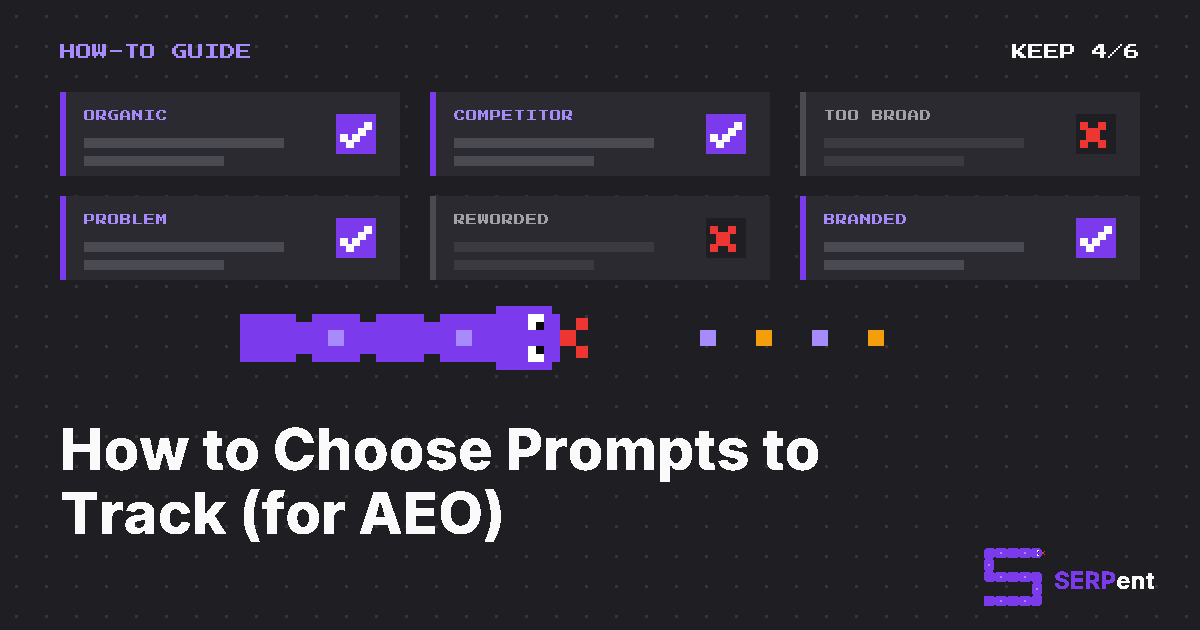
- Aim for 20 to 50 prompts, about 60% organic, 25% competitor and 15% branded. Report branded on its own.
- Freeze the list for at least four weeks before you judge it. Add prompts rather than rewording them.
Why the prompt list matters more than the tool
AI answers are inconsistent by design. In SparkToro's January 2026 study of 2,961 runs across ChatGPT, Claude and Google's AI, there was less than a 1 in 100 chance of getting the same list of brands twice in 100 runs of the same prompt. The same research found that the leading brands still showed up in most answers. Individual answers are noisy, but rates across many answers are meaningful.
That has two consequences for choosing prompts:
- Each prompt should stand for a real question, not a lucky phrasing. You're sampling what buyers ask. Ten rewordings of one question tell you less than ten different questions.
- Breadth beats repetition. Peec AI's analysis of its own tracking data, published September 29, 2026, compared two ways to spend 1,500 runs a month: 50 prompts run once a day gave a monthly margin of about ±6 points, while 10 prompts run five times a day gave about ±13. That's vendor data, but the logic holds: more distinct prompts give you a steadier picture than hammering a few.
So the work that matters most happens before you track anything: deciding which questions belong in the sample.
Prompts aren't keywords, and AI Overviews aren't chatbots
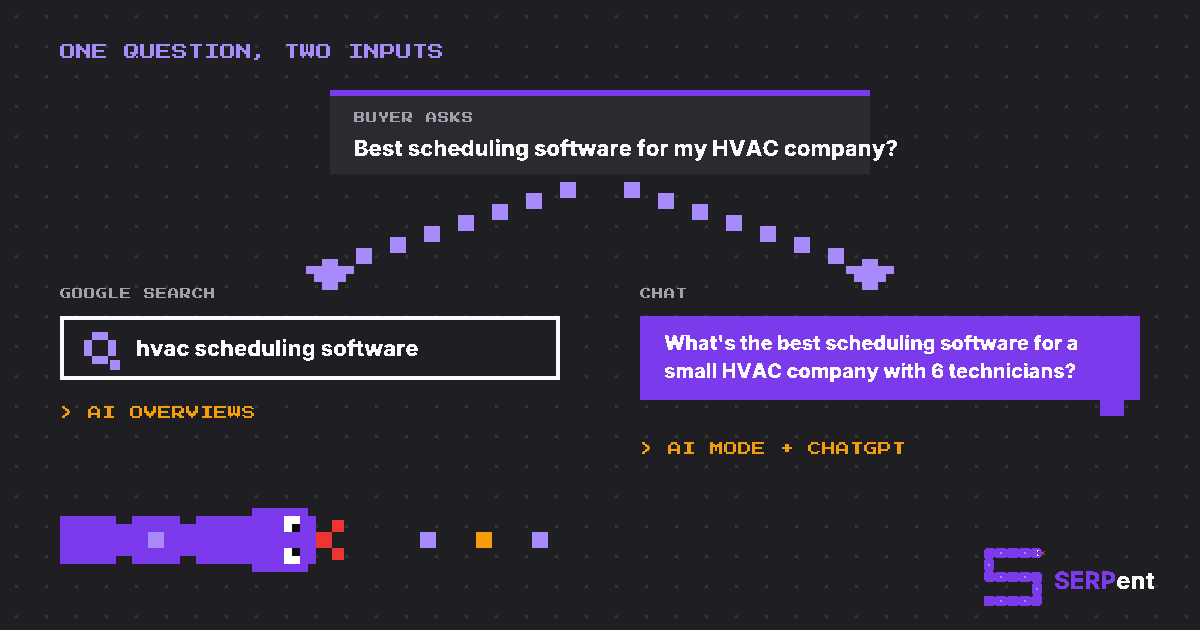
This is the part most prompt guides skip. The three AI surfaces most agencies care about don't receive the same input:
| Surface | What triggers it | What to track | Example |
|---|---|---|---|
| Google AI Overviews | A normal Google search. Google decides whether to show an overview. | A seed keyword: what people type into Google. | hvac scheduling software |
| Google AI Mode | A question typed into AI Mode, often longer and conversational. | A full prompt. | What's the best scheduling software for a small HVAC company with 6 technicians? |
| ChatGPT | A question typed into a chat, sometimes with context and constraints. | A full prompt. | Same as AI Mode, worded the way a buyer would ask it. |
The data backs up the split:
- Google searches are short, and short searches rarely show an AI Overview. In Pew Research Center's analysis of 68,879 real Google searches by US adults in March 2025, an AI summary appeared on only 8% of one- or two-word searches, but on 53% of searches with 10 or more words. Question-style searches starting with who, what, when or why triggered one about 60% of the time.
- AI Mode prompts run longer. Semrush's clickstream study of about 69 million US sessions (May to July 2025) found AI Mode queries averaged 7.2 words, against 4.0 for regular Google searches.
- ChatGPT prompts are different again. Semrush's April 2026 analysis of US ChatGPT usage put the average prompt at 13.5 words when ChatGPT didn't search the web and 8.7 words when it did (January to February 2026).
- The same question gets different sources. Ahrefs compared AI Overviews and AI Mode answers for the same queries in September 2025 and found they cited the same URLs only 13.7% of the time.
So pair every chat prompt with a seed keyword. Track the keyword in Google AI Overviews and the full prompt in Google AI Mode and ChatGPT. If you send a 20-word question to Google, you're measuring a search almost nobody makes. If you send "hvac scheduling software" to ChatGPT, you're measuring a prompt almost nobody types.
That's how SERPent is built: every prompt has its text, as a person would ask it, plus a search query for AI Overviews. SERPent suggests the search query from the prompt text, and you can edit it.
Step 1: Start with what the business sells
Don't start with prompts. Start with the business:
- List the topics that make money. These are the 5 to 8 products, services or use cases the client wants to be recommended for. If you wouldn't invest content or PR effort in a topic, don't track it.
- Name who buys each one. Write down the buyer's role, company size, industry and location, and the constraints they care about: budget, integrations, compliance, speed.
- Note the competitors that matter. Write down the 3 to 5 brands the client loses deals to, not the ones that rank next to them on Google. You'll track these brands alongside the client.
Constraints are what turn a generic question into a buying question. "What is field service software?" gets an explanation. "Which field service software works with QuickBooks for a 6-person HVAC team?" gets a shortlist of brands. Shortlists are where visibility is won or lost, so most of your prompts should carry at least one constraint.
Step 2: Collect real questions
Write down what buyers actually ask, from as many places as you can. Each source has its own bias, so blend them:
- Google Search Console. Long queries are the closest thing you have to prompts. In the Performance report, filter Query with a custom regex such as
^(\S+\s+){6,}\S+$for queries of seven words or more, or^(who|what|where|when|why|how|which|best|can|does|is)\bfor questions. - Keyword tools. Prompts have no search volume, but the searches behind them do. Use Semrush's Keyword Magic Tool or Mangools' KWFinder to pull the question keywords around each topic, and to check that the seed keywords you'll track for AI Overviews actually get searched. Keep the volumes: they're a good tiebreaker when you score prompts in Step 5.
- Sales calls and demo notes. Ask the sales team for the questions prospects ask on the first call, and how they describe the problem before they know the product category.
- Support tickets and chat logs. These are good for problem prompts and for accuracy checks on the brand.
- "How did you hear about us?" If a lead says ChatGPT, ask what they asked it. Add that as an optional field on the demo form.
- People Also Ask and AI Overviews follow-ups. These show how Google groups the questions around a topic.
- Reddit, Quora and niche forums. This is where people describe their situation in full, which is exactly how they write prompts.
- The AI answers themselves. Run your draft prompts and look at the follow-up questions and the searches the AI ran to build the answer. SERPent's ChatGPT tracker shows the searches ChatGPT made for each answer, which is a good source of new prompts and seed keywords.
At this stage, quantity is fine. Aim for 80 to 150 raw questions. You'll cut most of them in Step 5.
Step 3: Write each one as a prompt and a seed keyword
Turn each raw question into a trackable prompt, then pair it with a seed keyword:
- Write it the way the buyer would ask it. Use full sentences and their words, not your product's feature names.
- Use one variable per prompt. "Best HVAC scheduling software for a small team" and "Best HVAC scheduling software that works with QuickBooks" tell you different things. A prompt that asks about team size, integrations and price at once tells you nothing you can act on.
- Keep the brand name out of organic and competitor prompts.
- Use the market's own words. If the client sells in more than one country, track the list in each market, and add a prompt for any question that's worded differently there: "sales tax" in the US is "GST/HST" in Canada, and a "401(k)" is an "RRSP".
- Choose seed keywords that show an AI Overview. Search the keyword on Google in the right market. If it never shows an overview, try the question form ("how to schedule hvac technicians") or a more specific variant.
| Raw question (from a sales call) | Prompt (ChatGPT and AI Mode) | Seed keyword (AI Overviews) |
|---|---|---|
| "We're still doing dispatch on a whiteboard" | What's the easiest way for a small HVAC company to stop scheduling technicians on a whiteboard? | hvac dispatch software |
| "Does it work with QuickBooks?" | Which field service scheduling tools integrate with QuickBooks Online? | field service software quickbooks integration |
| "We looked at ServiceTitan, but we're only six people" | What are cheaper alternatives to ServiceTitan for a 6-person plumbing business? | servicetitan alternatives |
Shortcut: turn a keyword list into prompts in Google Sheets
If you're starting from a keyword export rather than real questions, you can draft prompts for the whole list at once with Gemini in Google Sheets. The AI function is available on Google Workspace and Google AI plans that include Gemini in Sheets.
- Export your keywords from Semrush or KWFinder, with volumes. Cut anything off-topic, then paste the keywords into column A under the header Search Query. Those keywords become your AI Overviews inputs.
- Set up two cells for the client. In F1, describe the buyer, for example "owner of a 6-person HVAC company". In F2, put the client's brand name.
- Add three headers: Prompt in B1, Prompt Type in C1 and Intent in D1.
- Draft the prompt. In B2, paste this formula and fill it down:
=AI("Rewrite this Google search as the question a "&$F$1&" would type into ChatGPT while deciding what to buy. Write one natural question of 12 to 25 words. Keep the search intent and any product, brand or place it names. You may add one realistic detail about their situation, such as team size, budget or a tool they already use, but nothing more. Never mention "&$F$2&". Reply with the question only.", A2)
- Label the type and intent. In C2 and D2, paste these and fill them down:
=AI("Reply with one word: BRANDED if this question names "&$F$2&", COMPETITOR if it names any other company or product, otherwise ORGANIC.", B2)
=AI("Reply with one word for the intent of this question: INFORMATIONAL, COMMERCIAL or TRANSACTIONAL.", B2)
Two details make this different from a straight rewrite. The buyer in F1 and the one allowed detail push each prompt toward a shortlist question, which is where brands get named (see Step 1). And keeping the brand name out of the draft means your organic prompts stay organic.
Treat the output as a first draft:
- Run 10 rows first. Check that the questions sound like your buyer before you fill down hundreds.
- Read every row. Fix anything that invents a detail the business doesn't offer, or that reads like a keyword with a question mark on the end.
- Paste as values once you're happy, so the prompts don't change later.
- Score and cut in Step 5, like any other source.
The columns line up with SERPent's CSV import, which reads columns by their header, not their order. You can download the sheet as a CSV and upload it as it is. Columns F and beyond are ignored.
Step 4: Label every prompt by type and intent
Give each prompt a type. It changes how you read the results:
- Organic: category and problem prompts with no brand names. "Best scheduling software for HVAC contractors" or "How do I cut drive time between service calls?" These measure whether AI recommends you unprompted, and they should be most of your list.
- Competitor: prompts that name a competitor. "ServiceTitan alternatives for small teams" or "Jobber vs Housecall Pro". These show whether you get into the conversation when buyers are already comparing.
- Branded: prompts with your brand name. "Is Crewline good for plumbers?" or "How much does Crewline cost?" These are accuracy checks: is the AI describing your pricing, features and locations correctly?
Keep branded results separate in every report. An answer to a question that names your brand nearly always mentions you, so blending branded prompts into your overall visibility makes it look better than it is. SERPent labels each prompt Organic, Competitor or Branded, and leaves branded prompts out of share of voice for exactly this reason.
Then tag intent: informational (learning about a problem), commercial (comparing options) or transactional (ready to buy or sign up). Commercial and transactional prompts are where brand recommendations happen. Informational prompts are where citations to blog content tend to come from, so keep a few if content is part of the client's plan.
Step 5: Score each prompt and cut
Most raw lists are too long and too vague. Score every prompt from 0 to 2 on four questions:
| Criterion | 0 | 1 | 2 |
|---|---|---|---|
| Business value | Off-topic or low-margin | Related to a product | A core product the client wants to grow |
| Buying stage | General curiosity | Researching the problem | Comparing or choosing a provider |
| Winnability | Nothing you could do would change the answer | Possible with new content or PR | You already have, or can quickly make, a strong page or listing for it |
| AI names brands | The answer is generic, with no brands or sources | Some brands or sources, sometimes | A clear shortlist of brands every time |
Keep prompts that score 6 to 8. Keep 4s and 5s if you have room. Cut anything under 4. A prompt with high value and low winnability isn't wasted: it's a content brief. Write the page first and add the prompt when there's something to measure.
To score "AI names brands", run the prompt once or twice in ChatGPT and AI Mode, and search the seed keyword on Google. It takes a minute per prompt and saves weeks of tracking prompts that never mention anyone.
How many prompts should you track?
Guides on this give answers anywhere from 15 to several thousand. Here's a recommendation that adds up, based on who you're tracking for:
| Situation | Prompts to start with | Why |
|---|---|---|
| Local business or single service | 15 to 25 | Few topics, one market. Cover each service and each buyer question once. |
| One brand or SaaS product | 30 to 50 | 5 to 8 topics with 4 to 6 prompts each, plus competitor and branded prompts. |
| Several products or markets | 30 to 50 per product or market | Each product and market has its own competitors and wording. |
| Agency, per client | 20 to 50 | Enough to report per topic without blowing the budget across the client roster. |
The mix. For a 40-prompt list, that's about 24 organic prompts (say 14 category and 10 problem), 10 competitor prompts and 6 branded prompts. Spread them across topics, so no single topic has fewer than 3 prompts: one prompt per topic is an anecdote, not a measurement.
The samples. SERPent runs every prompt 3 times a day on each platform. A 40-prompt list gives you 120 answers per platform per day, or about 840 per platform per week. That's enough to read weekly trends per topic, not just for the list as a whole.
The budget. AI visibility tools price by prompt, so the list is also a cost decision. SERPent's plans include 15 prompts (Starter, $29 a month), 50 prompts (Brand, $79) and 200 prompts across up to 10 sites (Agency, $249). A prompt tracked in both the US and Canada counts as two. See pricing for the details.
For reference, here's what other prompt-tracking guides recommend:
| Guide | Recommended starting point |
|---|---|
| Semrush (June 9, 2026) | About 25 prompts |
| SE Ranking (April 23, 2026) | 20 to 40 prompts |
| Otterly.AI (September 30, 2026) | 25 to 50 prompts |
| Nightwatch | 25 to 50 prompts, about 70% unbranded |
| Profound (February 10, 2026) | About 100 prompts |
The common ground is clear: start in the dozens, weight toward unbranded prompts, and expand once you've seen a month of data.
Worked example: an agency client from scratch
Here's the whole process for a made-up agency client, Crewline: scheduling and dispatch software for HVAC and plumbing contractors, sold in the US and Canada.
Step 1: topics, buyers and competitors. Five topics: scheduling and dispatch, invoicing, QuickBooks integration, a mobile app for technicians, and pricing for small teams. The buyer is the owner or office manager of a contractor with 3 to 20 technicians. Four competitors the sales team loses deals to.
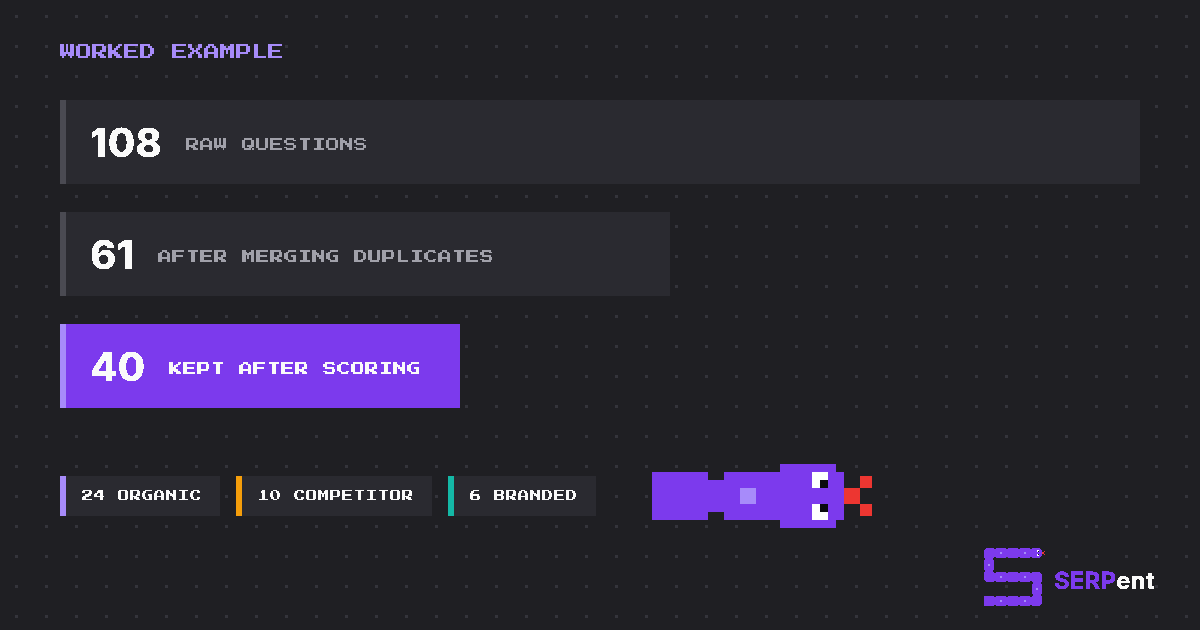
Step 2: raw questions. Search Console gave 41 long queries, the sales team gave 22 first-call questions, support gave 15, Reddit and People Also Ask gave 30 more. That's 108 in total.
Steps 3 to 5: write, label, score. After merging duplicates, 61 prompts were left. Scoring cut 21: mostly generic "what is field service management" questions where AI named no brands, plus a few for a payroll feature Crewline doesn't sell. That left 40 prompts in the US market.
Here are some of them:
| Prompt | Seed keyword | Type | Intent | Score |
|---|---|---|---|---|
| What's the best scheduling software for a small HVAC company? | hvac scheduling software | Organic | Commercial | 8 |
| How can a plumbing business cut drive time between service calls? | reduce drive time field service | Organic | Informational | 5 |
| Which field service apps work with QuickBooks Online? | field service software quickbooks integration | Organic | Commercial | 8 |
| Is there a dispatch app my technicians can use offline? | offline field service app | Organic | Commercial | 7 |
| What are cheaper alternatives to ServiceTitan for a small team? | servicetitan alternatives | Competitor | Commercial | 8 |
| Jobber vs Housecall Pro for an HVAC business | jobber vs housecall pro | Competitor | Commercial | 7 |
| How much does Crewline cost per technician? | crewline pricing | Branded | Transactional | 6 |
The final 40 broke down as 24 organic, 10 competitor and 6 branded, with at least 6 prompts per topic. Crewline also sells in Canada, so the agency added two prompts with Canadian wording ("GST/HST invoicing" alongside "sales tax invoicing") and tracked the list in both the US and Canada markets. That's 42 prompts in two markets, or 84 tracked prompts, inside an agency plan with room left for other clients.
A prompt tracking template you can copy
Copy this into a spreadsheet. The first four columns match SERPent's CSV import, so you can upload the sheet as it is. The rest are for your own planning and reporting.
Prompt,Search Query,Prompt Type,Intent,Topic,Persona,Source,Score,Added
"What's the best scheduling software for a small HVAC company?",hvac scheduling software,ORGANIC,COMMERCIAL,Scheduling,Owner 3-20 techs,Sales call,8,2026-10-07
"Which field service apps work with QuickBooks Online?",field service software quickbooks integration,ORGANIC,COMMERCIAL,Integrations,Office manager,Search Console,8,2026-10-07
"What are cheaper alternatives to ServiceTitan for a small team?",servicetitan alternatives,COMPETITOR,COMMERCIAL,Pricing,Owner 3-20 techs,Sales call,8,2026-10-07
"How much does Crewline cost per technician?",crewline pricing,BRANDED,TRANSACTIONAL,Pricing,Owner 3-20 techs,Support,6,2026-10-07
Prompt Type is ORGANIC, COMPETITOR or BRANDED, and Intent is COMMERCIAL, TRANSACTIONAL or INFORMATIONAL. Leave Search Query blank and SERPent will suggest one from the prompt text.
Which AI prompts to track, and which to skip
In short, track the questions a buyer asks when they're choosing: organic category and problem prompts with a real constraint, the competitor comparisons your sales team hears, and a few branded accuracy checks. Some prompts look useful but quietly ruin the data, so skip these:
- Your brand name in discovery prompts. "Best CRM like Crewline" is a branded prompt, not an organic one.
- Questions with no buyer behind them. "What is HVAC?" won't produce a shortlist of brands, and the client can't act on the answer.
- Rewordings of the same question. Three phrasings of one question count as one data point three times over. Pick the most natural phrasing, and spend the slot on a different question.
- Topics the client doesn't sell, or markets it doesn't serve. They inflate the list and dilute every rate.
- One-off trends. A prompt about this week's news will be irrelevant by the time you have enough data to read it.
- Prompts stuffed with conditions. If a prompt specifies team size, budget, an integration and a location at once, you won't know which one decided the answer.
Keep the list stable, and know when to change it
A prompt list is only useful if you can compare one period with the next:
- Freeze it for at least four weeks before you judge anything. Read trends weekly, not daily.
- Add prompts rather than rewording them. A reworded prompt is a new prompt, and its numbers start from zero. In SERPent, rewording a prompt starts a new version, and the old version's history stays visible.
- Retire prompts instead of deleting them. When a product is discontinued, retire its prompts: collection stops, but their history stays.
- Review quarterly. Cut prompts that never return brands, and add new ones for launches, new competitors and the questions the sales team is hearing now.
- Change the list between reporting periods, not in the middle of one. That way, every report compares like with like.
For agencies: prompt sets across many clients
The same method works for every client, with a few additions that keep it manageable:
- Run a 30-minute intake call. Ask for the topics that make money, the competitors they lose to, the top questions sales and support hear, and the markets they sell in. Most of Steps 1 and 2 come out of that call.
- Get the list signed off. It's much easier to report against prompts the client agreed to than to defend your choices after a bad month.
- Reuse a template for each vertical. The topics differ, but the structure (types, intents, mix and scoring) stays the same. That makes clients comparable and new ones faster to set up.
- Report branded and non-branded separately, with the n. Clients will check ChatGPT themselves and get a different answer. A report that says "seen in 18 of 30 answers" makes that conversation easy.
- Budget across the roster. Give each client a prompt allowance based on their topics and markets, not a flat number. A single-location client might need 15 prompts, and a multi-market SaaS client 60.
SERPent was built by an SEO agency to work this way, with each client's prompts, competitors and markets kept separate. See how SERPent works for agencies, or read how to track brand mentions on ChatGPT for what to do with the data once the list is running.
How to choose prompts to track: FAQ
Which AI prompts should I track first?
Start with organic, commercial prompts: the "best [category] for [situation]" and "which [product] works with [tool]" questions buyers ask when they're building a shortlist. Add the competitor comparisons your sales team hears most, then a handful of branded prompts to check that AI describes you accurately.
How many prompts should I track for AEO?
Start with 15 to 25 for a local business or a single service, 30 to 50 for one brand or SaaS product, and 20 to 50 per client if you're an agency. More distinct prompts beat running a few prompts more often, so add breadth before you add repetition.
What's the right mix of branded and non-branded prompts?
Mostly non-branded. A good starting split is about 60% organic (category and problem prompts), 25% competitor prompts and 15% branded. Report branded prompts on their own: an answer to a question with your brand name in it almost always mentions you, so mixing them in inflates your visibility.
What's the difference between a prompt and a keyword?
A keyword is the short phrase someone types into Google, like "hvac scheduling software". A prompt is the full question someone asks ChatGPT or AI Mode, often with their situation and constraints. Track keywords for Google AI Overviews and prompts for ChatGPT and AI Mode, since that's what each one actually receives.
How often should I change my prompt list?
Keep it frozen for at least four weeks so you can compare periods fairly. After that, add prompts when you launch something or find a gap, and review the whole list quarterly. Avoid rewording live prompts: a reworded prompt is a new prompt, and its numbers start again.
Should I include my brand name in prompts?
Only in a small, separate branded group, used to check that AI describes you accurately (pricing, features, locations). Category, problem and competitor prompts should never contain your brand name, because the point is to find out whether AI recommends you unprompted.
How many runs does a prompt need before a change is real?
More than one, always. AI answers vary from run to run, so a single answer proves very little. Read rates over weeks rather than days, and treat small moves as noise until they hold. That's why SERPent shows the n, the number of answers, next to every rate.
Which AI platforms should I track prompts on?
The ones your customers use. For most agencies' clients that means Google AI Overviews and AI Mode (because they sit inside Google) and ChatGPT. SERPent tracks those three. Report each one separately, because they cite different sources for the same question.